Part 1
Setup Stack™
Every SMC and ICT concept, graded into one clear entry.
- Golden Setups graded A, A+ and A++
- Entry, stop-loss, break-even and two targets
- Runs directly in NinjaTrader
- Pine Script version included
Your own copy trading terminal, a full indicator and strategy, and built-in auto execution. It all runs on your PC, and you never pay a monthly software fee again.
On sale: $649 $399 · One payment, no subscriptions
CL1!1H
Setup Stack · SMC + ICT
Waiting for everything to align…
Works on forex, indices, futures and commodities.
Most traders rent their setup one subscription at a time. All-Access replaces all four, and every one of those jobs is already built in.
Pick the plans you pay for now
Your charting platform
$69.95/mo
Your trade copier
$49/mo
Your setups and signals
$39.99/mo
Your alerts-to-orders bot
$29/mo
Month-to-month prices from each company's website, checked November 2026. Paying yearly can cost less. NinjaTrader, market data, broker and prop firm costs aren't counted.
You're paying
Pays for itself in about 3 months.
After that, there's nothing left to pay.
Get All-AccessOther companies sell you these one at a time. Here they're already wired together, from the signal to every account you trade.
All-Access in 2 minutes
Video coming soon
It reads the market and grades every entry.
Your signal becomes a real order, hands off.
Every follower follows at the size you set.
Managed from one screen, on your own PC.
Every SMC and ICT concept, graded into one clear entry.
Copy, chart and execute from one screen.
Your signals, placed for you.
An all-in-one copy trader with a full trading terminal built in. It runs on your own PC, so there's no cloud account and no monthly seat.
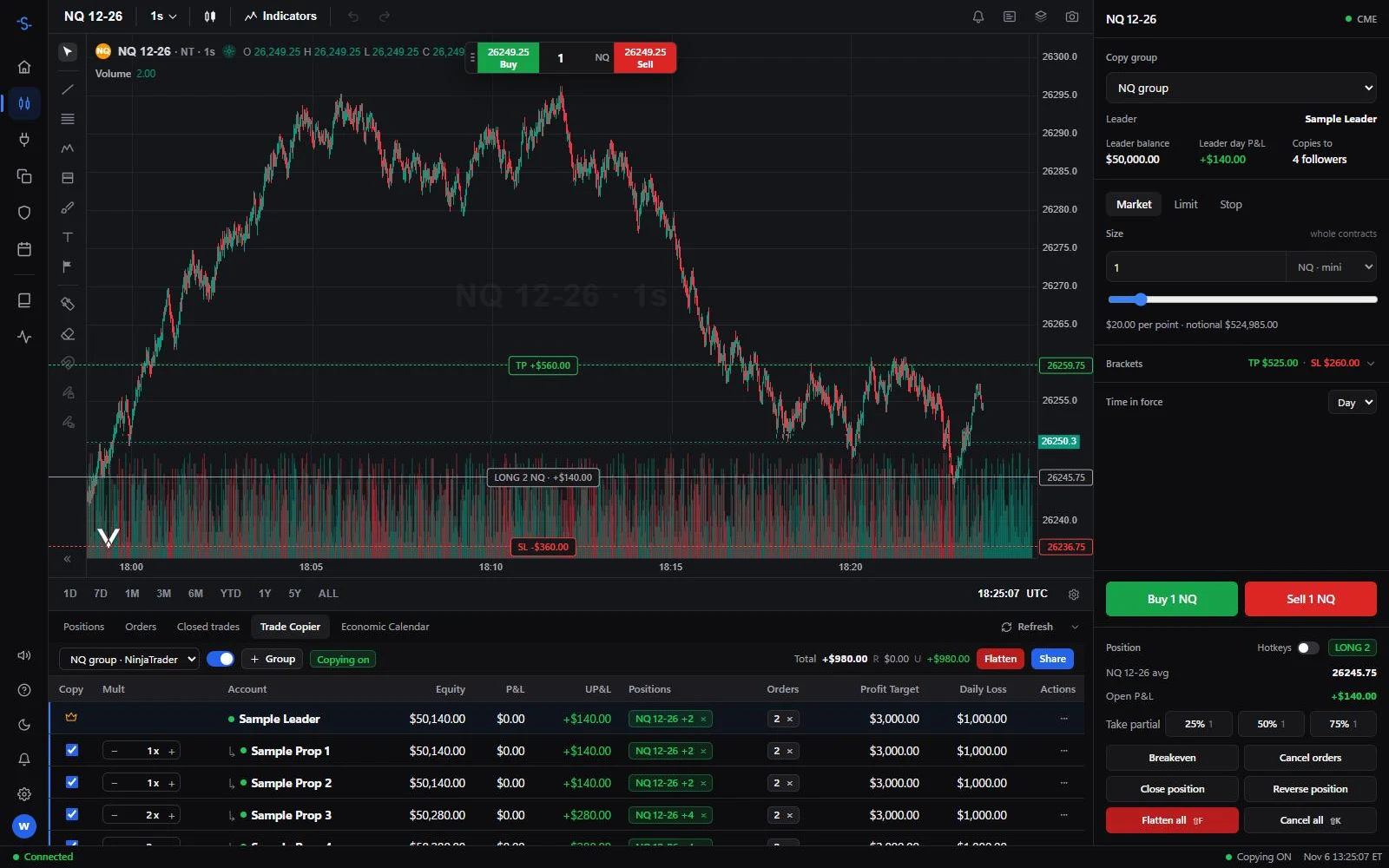
Your chart, your accounts and your order ticket, side by side, with no tabs to juggle mid-trade.
The real app, running on sample accounts.
Trade your leader, and every follower copies it at the size you set.
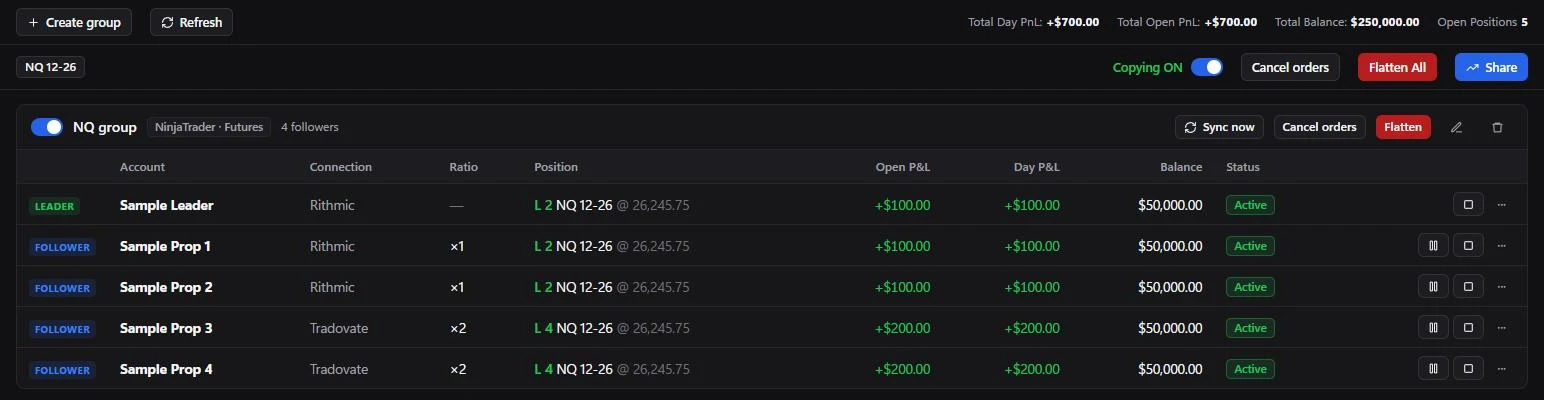
Your first copy group
Video coming soon
Copy accounts on any broker you connect to NinjaTrader, including Rithmic and Tradovate, in the same group.
Copy Vest accounts with your entries, partials, closes, limit orders and TP and SL on every follower.
Set a multiplier for each follower, then pause, flatten or sync any account whenever you need to.
Kill switch
All copying off in one hotkey
Alarms
Disconnects, rejections, out of sync
Circuit breaker
Stops runaway orders
Risk limits
Daily loss, target and max size
No late orders
Cancelled, never sent late
Trade journal
Stats, charts and a P&L calendar
News calendar
This week's events by impact
P&L share cards
Ready for Discord or X
Connection monitor
Speed of every feed and broker
Four looks
Pick the theme you like
If you trade SMC or ICT, you've probably juggled separate scripts for structure, order blocks, FVGs and liquidity — then still had to decide the entry yourself. They clash, clutter your chart and eat your indicator slots.
Setup Stack™ scores every setup against its checklist. When it passes, a green (long) or red (short) arrow with a golden border prints on your chart, graded and ready with your entry, stop-loss and targets.
Illustrative example
A setup only starts when a trigger fires — a liquidity sweep, a CHoCH or a mitigated zone — and it must agree with your higher-timeframe bias.
Every item on the checklist is scored the moment it triggers. The more confluences line up, the higher the grade. Below an A, nothing prints.
Each Golden Setup draws its Entry, Stop-Loss, Break-Even, TP 1 and TP 2. When the next one forms, the old levels clear and the new ones take their place.
Get pinged the second an A, A+ or A++ setup prints — no need to stare at charts all day.
How to read a Golden Setup
Video coming soon
This chart is interactive — flip the switches to turn each concept on and off and see where it plots. Golden Setups and the checklist stay sharp; the rest is a blurred preview until it's on your own chart.
Interactive — click to switch concepts on & off
7 / 7 onSetup Stack combines the SMC and ICT tools traders actually use — built to work together, so every level agrees with every other level.
Swings · BOS · CHoCH · CHoCH+
Swing highs and lows, breaks of structure, changes of character (plus displacement-confirmed CHoCH+), equal highs/lows and trendlines — labelled the moment they confirm.
FVG · HTF FVG · IFVG · VI
Every gap is tracked through its whole life — formed, mitigated, violated, inverted — plus higher-timeframe gaps and volume imbalances.
OB · Breaker
The last opposing candle before a displacement that breaks structure — and when it fails, it flips into a breaker block automatically.
BSL · SSL · EQH / EQL · DOL
Resting liquidity, sweeps that close back inside, and the clear opposite draw on liquidity — only when no zone is blocking the path.
Correlated pairs
Flags when your symbol makes a lower low while its correlated pair makes a higher low (or the reverse) — a classic smart-money tell.
PD Arrays · OTE
See instantly whether price is cheap or expensive, with the optimal trade entry zone marked.
Bias · PDH / PDL · PWH / PWL
Higher-timeframe bias filters every setup, with prior day, week and session highs and lows on your chart.
A · A+ · A++
When everything aligns, a graded long or short arrow prints with entry, stop-loss, break-even and two take-profits — plus alerts for every grade.
One indicator · every market · every timeframe
Setup Stack's signals can trade straight from NinjaTrader. There are no TradingView alerts, no webhooks and no bot subscription in the middle.
Auto Execution
Illustrative
Turn on Auto Execution
Video coming soon
Set the lowest grade it takes, the direction and how many trades can run at once.
Use a limit order that cancels itself if it doesn't fill, or enter at market.
Block new orders for the minutes around US news, using your own window.
It can sit out when recent signals stop working, then start again by itself.
Set contracts by grade and stop width, with a cap on what each trade risks.
Everyone else rents you access and keeps the code. Here you get the full source code and white-label rights, and it all runs on your PC. Change anything, or sell it under your own name.
Try it
Your Brand Terminal
A quick preview. In your own copy, you change this in the code.
Customize and rebrand it
Video coming soon
What you can do
What the license doesn't allow
Check out securely with Lemon Squeezy. There's nothing to renew and nothing to cancel.
Get the software and its full source code from your customer login, along with every new version.
Follow the tutorials to set everything up on your own PC, then customize anything you like.
Install everything on your PC
Video coming soon
| Feature | All-Access | Monthly subscriptions |
|---|---|---|
| Monthly software fees | $0 | Every month |
| If you stop paying | You keep everything | Access ends |
| Indicator, copying and automation | One package | Separate services |
| 1-second charts | Included | Extra monthly cost |
| Where it runs | Your PC | Often their cloud |
| Full source code | ||
| Customize anything | Settings only | |
| Sell it under your own brand |
It's for you if
It's not for you if
There are no plans to compare and nothing to renew. You pay once and everything is yours.
$399one-time
No subscription, ever.
Everything included
Code SALE399 is applied for you at checkout.
Pay once. Download every new version whenever you need it.
One payment gets you everything: Setup Stack™ (indicator and strategy), SM Copy Terminal and built-in auto execution, plus the full source code, white-label rights, tutorials and every new version.
Just click any buy button. Code SALE399 is applied for you at checkout, taking the price from $649 to $399.
A Windows PC, NinjaTrader and your own broker or prop firm connection with market data. Keep NinjaTrader open while copying futures. Vest copying also needs Chrome or Edge installed. Any NinjaTrader, data, broker or prop firm costs are separate and stay between you and them.
No. SM Copy Terminal has its own charts, Setup Stack runs directly in NinjaTrader, and auto execution trades from there, so you don't need TradingView Premium or webhook alerts. The Pine Script version is included if you still want it.
Down to 1 second. You get 1s, 5s, 15s and 30s candles at no extra cost, while TradingView's second-based charts start at its Plus plan ($34.95 a month). Futures charts use your NinjaTrader data feed. Vest doesn't offer second candles, so your PC records them from the live feed and keeps 7 days of history.
SM Copy Terminal copies futures accounts on any broker you connect through NinjaTrader, including Rithmic and Tradovate. It also copies Vest Markets perpetuals accounts. Futures copy to futures and Vest copies to Vest, because copying between the two isn't built yet. Always check your prop firm's rules on copy trading first.
You can edit the software, put your own name and logo on it, and sell the finished tool to your own customers. You can't resell or give away the source code, or pass the white-label rights on to anyone else. The small Vela credit on charts also has to stay, because the chart library requires it.
Log in with your checkout email any time and download the newest version of each product. Your own edits live in your own copy, so you'd carry them over to a new version yourself. If you break something, download a fresh copy. We support the software as we ship it, but not custom changes.
No. Everything is ready to use, and the tutorials walk you through setup. The source code is there for when you want to change something.
Yes. Setup Stack labels every concept directly on the chart, so you learn to recognise structure, liquidity and imbalances faster. Experienced traders get the same concepts without the manual drawing.
Please read our refund policy before buying. Because you receive the full source code, a download can't be returned. If anything isn't working, email support@streamlinedmarkets.com and we'll help.
No. Our software is a set of charting, copying and execution tools. It doesn't guarantee profits, and all trading involves risk. Test on simulated accounts first and always use proper risk management.
Still have a question? Email support@streamlinedmarkets.com